Angry Dance & Tsundere Stomp AI Filter Guide: Make Viral Stomp Videos from 1 Photo
 Angry Dance Studio Team
Step-by-step tutorial on turning any portrait or selfie into a hilarious Angry Dance or Tsundere Hmph Stomp 9:16 video—no reference clip or editing timeline required.
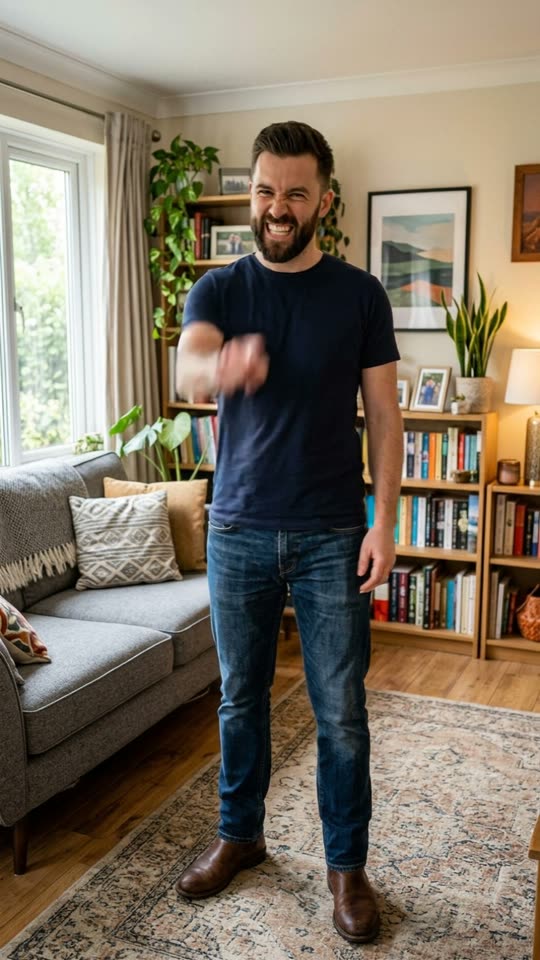
Few short-form AI formats hit as consistently in group chats, TikTok feeds, and Reels duets as the Angry Dance (also searched globally as Baile Angry) and its sweeter sibling, the Tsundere "Hmph!" Stomp.
The comedic formula is effortless: take a totally ordinary portrait—a stoic dad photo, a polished LinkedIn-style headshot, a couple selfie, or a cosplay portrait—and watch that exact person suddenly scowl, point at the lens, and stomp furiously to an upbeat dance track.
Previously, making an Angry Dance clip meant hunting down unwatermarked reference videos, wrestling with motion-capture rigs, or cropping aspect ratios across two different mobile apps. With Angry Dance's single-photo emotion-motion presets, one JPG or PNG portrait outputs a ready-to-post 5-second 9:16 MP4 in a single click.
1. Pick Your Attitude: 4 Signature Emotion & Groove Presets
Not every portrait calls for the same energy. Before uploading, match your photo's personality to the right preset:
| Effect Preset | Signature Acting & Motion | Best Source Photo |
|---|---|---|
| Angry Dance AI | Furious grumpy scowl, aggressive finger-point at camera, clenched fists & heavy rhythmic stomps | Front-facing half-body or full-body solo portrait |
| Tsundere Hmph Stomp AI | Tightly crossed arms, puffed-cheek pout, sharp head turn (“hmph!”) & cute frustrated foot stomps | Half-body selfie, outfit check, or anime/cosplay portrait |
| Give It All to Me AI | Cool unbothered expression, heavy-bass shoulder bounce, chest pop & sharp on-beat hand gestures | Serious suit portraits, ID-style photos, or deadpan selfies |
| AI Baby Dance | Upbeat arm swings, joyful hip wiggles & big giggles (58M+ cumulative TikTok trend plays) | Bright full-body photo of your own baby sitting or standing |
2. How to Generate an Angry Dance Clip in 3 Steps
Step 1: Choose a Well-Lit Upper-Body or Full-Body Photo
Open Angry Dance AI or Tsundere Hmph Stomp AI. Because both presets rely on arm gestures (finger-pointing or arm-crossing) plus shoulder and foot bounce, framing makes all the difference:
- Ideal crop: Head, shoulders, arms, and waist clearly inside the frame (
3:4or9:16phone portrait). Full-body standing shots give the most dramatic foot-stomp motion; half-body shots work especially well for Tsundere Hmph Stomp AI. - Keep hands unobstructed: Avoid photos where the subject is holding a large coffee mug in front of their face or hiding both arms behind another person's back.
- Consent rule: Always use your own photo or a photo of a friend or family member who gave permission—never upload public figures or anyone who has not agreed.
Step 2: Select Your Video Engine
Every Angry Dance preset runs on our multi-provider video pipeline with upfront credit pricing and automatic failover:
- Muse Video & Kling 2.5 Turbo (20 credits / sec): Both engines lock facial identity, hairstyle, outfit texture, and room background while driving crisp comedic acting across a 5-second
9:16clip. If one provider hits queue congestion, the engine automatically retries on the fallback model—and refunds 100% of credits if both fail. - Want custom duration or camera prompts? Open the general Image-to-Video Studio where you can switch between 5-second and 10-second clips or write your own acting prompt from scratch.
Step 3: Download Watermark-Free & Pair Trending Audio
Once rendered, download your clean 9:16 MP4 directly to your phone or desktop—zero watermarks, zero crop bars.
TikTok & Reels reach tip: Upload the silent or ambient MP4 into TikTok, tap Add Sound at the top of the editor, and attach the native trending sound (such as the viral Baile Angry beat or bass-drop track). Attaching native platform audio indexes your clip on that sound's discovery page alongside organic trend traffic tracked on our TikTok Viral AI Trend Radar.
3. Why Static-Camera Acting Beats Chaotic Camera Moves
If you inspect how Angry Dance AI and Tsundere Hmph Stomp AI keep faces recognizable even during exaggerated scowls and cheek puffs, the secret is separating subject motion from camera motion.
When a prompt asks an image-to-video model to perform fast rhythmic stomping while simultaneously panning or zooming the camera, background walls warp and facial features drift. Locking a Static camera keeps 100% of the model's motion budget focused on eyebrow furrows, puffed cheeks, finger-pointing, and crisp shoulder bounce.
Want dramatic camera movement instead? Pair camera motion with two-step scene presets like AI Action Figure Video—where your portrait is first sealed inside a 3D retail blister pack and then filmed with a smooth push-in as your miniature figure pushes open the plastic shell and walks onto the desk.
4. Start Creating or Explore What Is Breaking Out Today
- Launch the flagship stomp filter: Angry Dance AI
- Try the cute crossed-arms pout variant: Tsundere Hmph Stomp AI
- Test deadpan hip-hop bass swagger: Give It All to Me AI
- Customize 5s–10s prompts with Kling 2.5 Turbo in the Image-to-Video Studio
- Track live 24-hour TikTok format velocity on the AI Trend Radar (
/trends)